




Apple devices can be addictive: People buy one tiny iPod, fall in love, and end up with three or four other Apple products. Now if only they could see all their data on all those devices simultaneously.
Starting [October 12], they can.
ICloud is designed to store and replicate documents, music, apps and 1,000 photos on PCs, the iPhone, iPod Touch and iPad. It also syncs contacts, calendars and email so all your machines and devices have the same data and content. It will back up five gigabytes of data, but certain types aren’t counted against that total. The best part: It’s free.
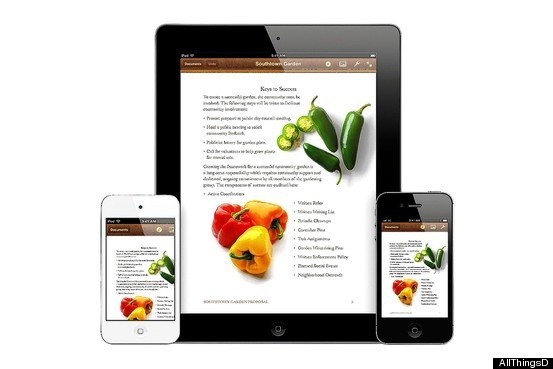
Thanks to iCloud, the iPhone, iPad and iPod Touch all have the same document with no work on the user’s part.
I’ve been testing iCloud’s sync ability between a MacBook Pro, iPhone 4S and iPad 3G. I also accessed and added content using iCloud.com. At first, I ran into a few hiccups with syncing photos, but an Apple spokesman explained that the company’s servers were occasionally down while they were being prepared for Wednesday’s iCloud launch. After that, iCloud worked without a hitch—well enough that I stopped thinking about which device held what since they were all updated with the same content.
Over the weekend, I imported 300 photos my parents took on a recent trip to Italy, forgetting that my computer was set up with iCloud. When I picked up my iPhone later, the Grand Canal in Venice and the Duomo in Florence were staring back at me in Photos. Same with my iPad.
On the downside, iCloud doesn’t automatically sync videos to other devices. In WiFi, it won’t sync edited photos if edits are made on a device after its camera app is closed. (This includes removing red eye, cropping and auto-enhancing images.) And document sharing on iCloud is focused on sharing with oneself, not with other people, unlike the document-sharing solutions from Google and Microsoft.
I found iCloud’s most useful feature to be Photo Stream, which automatically sends images captured by an iPhone, iPad and iPod Touch up to iCloud and replicates them on all other iCloud devices, one by one. Watching these photos pop onto the screen of my computer, iPad or iPhone was nothing short of delightful.
Photos are pushed via iCloud to the Mac and PC in their full resolution and sent to the iPad, iPod Touch or iPhone in a resolution that’s optimized for those displays.
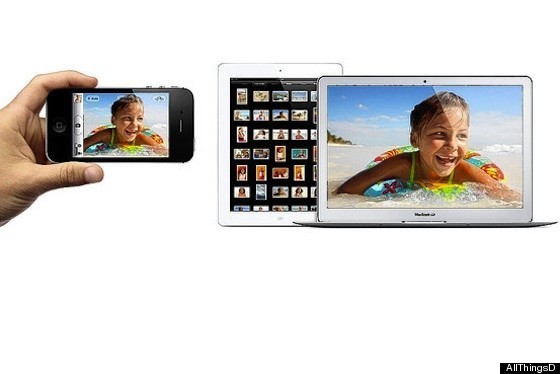
Photo Stream sends images captured by mobile devices, such as the iPhone and iPad, up to iCloud and replicates them on all other iCloud devices.
By default, any images imported to a PC or Mac are automatically sent into Photo Stream, though this setting can be turned off. Devices need only be powered on and in WiFi to receive images from Photo Stream.
Each photo remains in Photo Stream for 30 days, and only the last 1,000 are saved there. Photos moved into albums on devices will be kept permanently, while Macs and Windows PCs have no photo limit because of their larger storage capacities.
A WiFi network is also required for Backup in iCloud, which backs up purchased music, TV shows, apps, books, device settings, app data, messages, ringtones and images in Photo Stream. Only documents and email count against a person’s five gigabytes of free iCloud storage.
Higher storage capacities are available for an annual fee: $20 for 10 gigabytes, $40 for 20 gigabytes or $100 for 50 gigabytes.
Not Just Photos
Documents can be synced to all devices through iCloud using iWork apps. These include Pages, Keynote and Numbers, and each costs $10 in the App Store. I tested this with ease, creating documents—like a flyer I made using a photo of a church that I took with my iPhone camera—that synced with my iPad and vice versa. Changes to documents appeared the same across all devices and at icloud.com almost instantly.
To get an iCloud account, you’ll need either a Mac that’s running OS X Lion, Apple’s latest operating system, or a mobile device with iOS 5.
Starting Wednesday, when users can install the newest software on one of these machines, they will be prompted to set up iCloud. Once you have this account, iCloud will work with a Windows PC running Vista or Windows 7; instructions explain how to set up and use iCloud on Macs or Windows PCs. ICloud is also accessible via Web browser at icloud.com.
If you have an account with Apple’s MobileMe email and storage service, the company will offer to integrate it with your iCloud account. (MobileMe will be discontinued after June.) If you don’t have a MobileMe account, on-screen prompts will walk you through setting up a free me.com email address from any iOS device or computer. I did this in seconds using my MacBook, and noticed that my Mail and Notes were immediately replicated on all devices through iCloud.
Match That Tune
ITunes Match, an important piece of iCloud, wasn’t available for testing yet. To make sure your music library has a high-quality recording of each song, iTunes Match will scan your library for anything not purchased from Apple and then give you access to the high-quality iTunes track in the cloud and on all other devices. Match will be available at the end of this month for $25 a year and will work with up to 25,000 tracks.
Another interesting feature that wasn’t available for testing was Find My Friends, a free app that works with iCloud and is Apple’s answer to Foursquare. It will let iPhone, iPad and iPod Touch users find another user’s location—in list or map view—as long as they accept an invitation. Temporary location sharing will be possible with this app, enabling sharing with a specific number of people for a specific amount of time. This might come in handy during a family vacation or at a day-long music festival with friends.